
Five statuses
Scheduled, In Progress, Delivered, Cancelled and TONU. Deliberately few — the states a dispatcher actually uses, rather than a workflow to maintain.
Platform
DispatchTrace is one application, not a suite you assemble. This page walks through it in the order a load moves: dispatched, driven, delivered, invoiced, paid, and filed. Every module here ships today.
01 · Dispatch
The dispatch board is where most of the day happens, so it is built to be looked at by several people at once. Changes broadcast over a live connection: when a dispatcher moves a load, everyone else’s board moves with it. There is no refresh button because there is nothing to refresh.
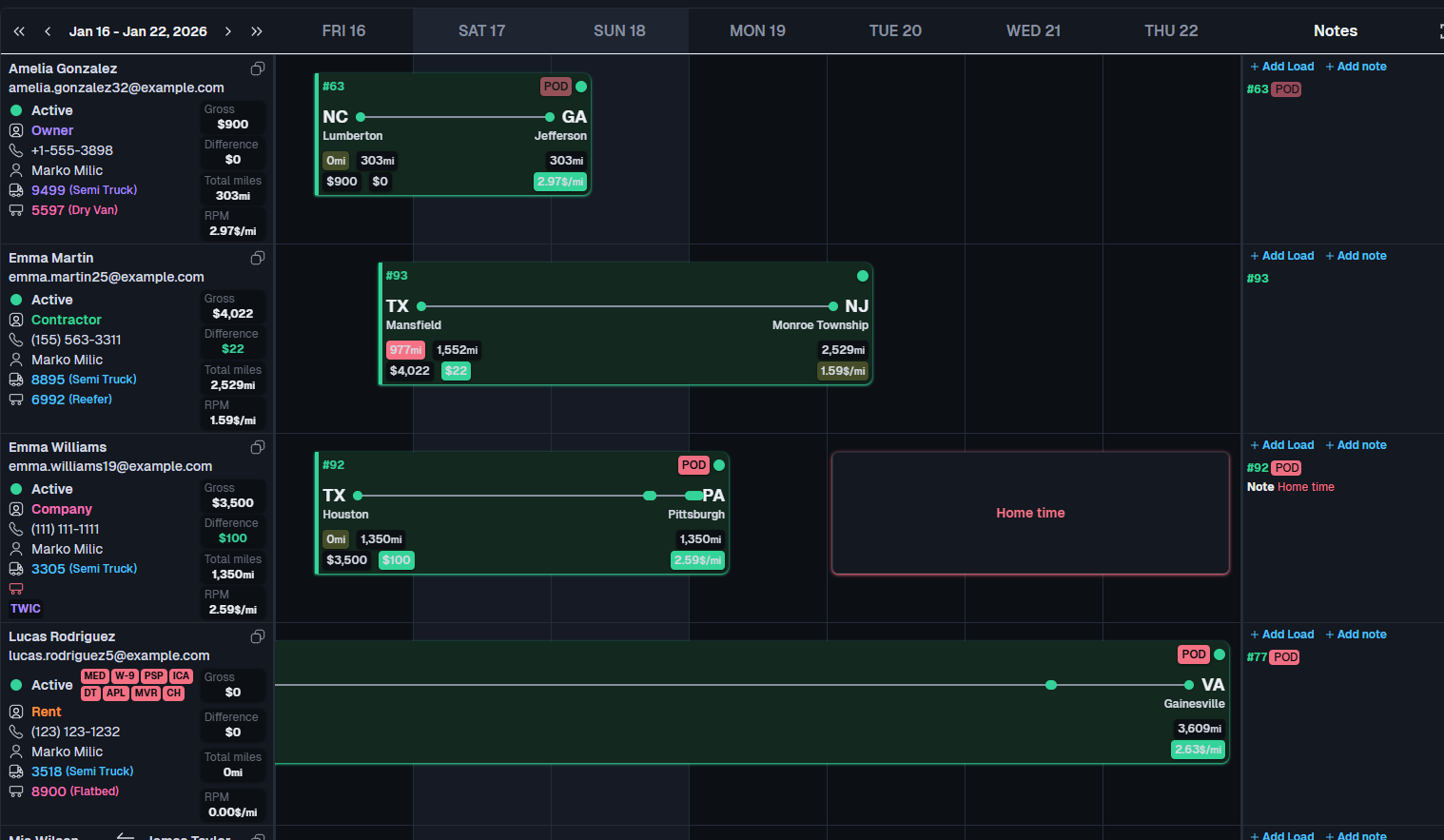
Scheduled, In Progress, Delivered, Cancelled and TONU. Deliberately few — the states a dispatcher actually uses, rather than a workflow to maintain.
Driver, truck, customer or status. Filter, sort and search across the whole board, then drag a load to another day or another driver.
Column selection and order are stored per user and per company, so a dispatcher and an accountant can look at the same data differently.
Short notes pinned to a driver with a start and end date — “home Thursday, back Monday” — that disappear on their own when they stop being true.
A running log of what happened on each load, so a question three weeks later has an answer that is not somebody’s memory.
Customer records with a no-buy flag, so a broker you have decided not to work with cannot quietly reappear on a load.
02 · AI extraction
Everywhere a PDF used to become data entry, the document is read for you. Extraction is never silent: the form shows which fields AI filled and asks you to confirm them before anything is saved, because a wrong appointment time costs a load.
Customer, pickup and delivery stops, appointment windows, agreed rate and reference numbers, read straight onto a new load.
Each payment, invoice number and check number pulled out of the factor’s report and matched against your outstanding invoices.
Parts and labour lines off a shop invoice, attached to the truck, with the driver’s share posted to their settlement if you split it.
A PDF application becomes a driver record with contact details, licence data and the compliance checklist already opened.
VIN, plate, weight rating and expiry date read off the document and written onto the truck or trailer record.
Loaded and empty miles estimated per leg, so drivers on per-mile pay settle without anyone looking up a distance by hand.
Bulk import is separate and does not need AI: drivers, trucks, trailers, settlements, fuel, tolls and payments all import from CSV or Excel with column mapping.
03 · Fleet
Every asset carries its own history: who drove it and when, what was spent on it, what is due, and what expires. Assignment changes are recorded rather than overwritten, so the question “who had this trailer in March” has an answer.
Full records with ownership type, financials, documents and per-asset load history. Cross-company views roll up across your whole group.
Every driver-to-truck and truck-to-trailer assignment is kept with its dates, not replaced.
Repair orders against a vendor with cost, documents and optional driver cost-sharing that posts to the settlement.
Oil changes, DOT inspections and the rest, due on either a date or a mileage threshold — whichever comes first.
Shops you use, with their details and location, so the same vendor is not entered five different ways.
Equipment payments for leased or rented trucks and trailers tracked as a liability, with a payment calendar.
04 · Safety and compliance
Compliance is where small carriers get hurt, and it is almost always a calendar problem rather than a knowledge problem. Every compliance item is a document with an expiry date; a background job checks them every fifteen minutes and escalates in two phases — a warning first, then an alarm — to the Company Admin, Safety and Fleet roles.
Nine default item types, each with its own document and expiry:
Tracked against the truck, the trailer or the carrier itself:
Policies across nine US trucking lines — auto liability, cargo, physical damage, general liability, bobtail, workers’ comp, occupational accident, trailer interchange and other — with the units each policy covers.
An accident registry with DOT recordability, insurance claims, claim notes, checks and any driver deduction arising from it.
Companies that supply drivers to you, with pay and banking details that flow onto the drivers linked to them.
DispatchTrace tracks documents and expiry dates and alerts on them. It does not calculate an IFTA return, generate FMCSA-ready filings, query the Drug & Alcohol Clearinghouse, or handle DVIRs. The clearinghouse consent is stored as a document, not as an API lookup.
05 · Roadside
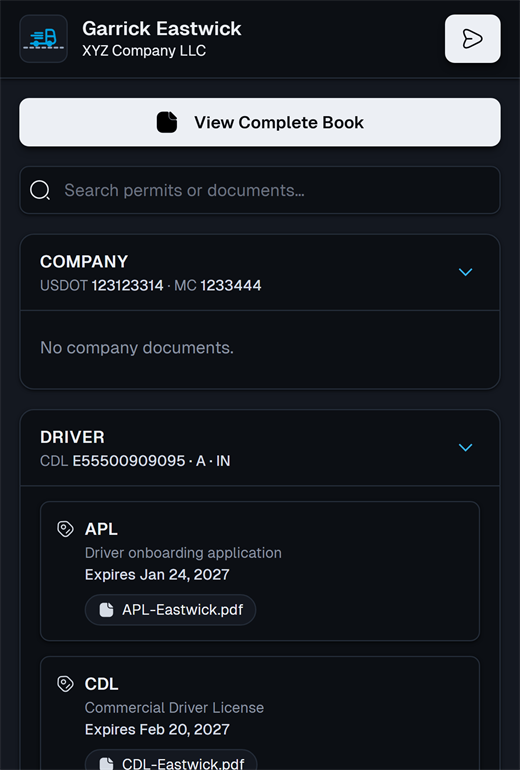
The one part of DispatchTrace designed to be used outside the office. A share link, gated by a short PIN and set to expire, that opens the truck’s document pack on any phone with no app and no account for the officer. Pages load progressively and phone photographs are downscaled on upload, so it opens on the kind of signal you get at a scale house.
Generated per truck. Print it for the cab or send it to the driver.
The link alone is not enough — a short PIN is needed to open the book.
Set how long the share stays live. It closes itself afterwards.
Registration, insurance, IFTA licence, MCS-90 and authority in a single document.
06 · Driver pay
A delivered load already knows its rate, its miles and its driver, so the settlement is assembled rather than typed. Deductions that repeat — truck rent, insurance, escrow, ELD fees — are scheduled once and post themselves, which is the single thing that most often pays for the subscription.
Co-drivers on a shared load split 50/50. A driver can be assigned to up to three dispatchers.
Set an amount, a run day and how many runs remain. A background job posts them daily, skipping weekends, with retroactive catch-up if something was added late. Pause and resume at will; every run is kept in the deduction’s history.
Nine built-in deduction types, plus any you define yourself.
Advances and credits alongside fuel and toll charges, imported from CSV where your card provider gives you one.
A negative settlement carries to the next period rather than vanishing, so escrow and repayment plans stay honest.
An approval workflow, then a branded PDF statement emailed to the driver — the document they will ask you about later.
07 · Money and reporting
Billing, factoring and receivables sit on the same records as dispatch, so an invoice is generated from the load rather than re-entered from its paperwork.
Invoices raised off the load, with lumper fees and accessorials, and the documents the customer needs attached.
Build a batch with sequential IDs, then export an Excel summary and a ZIP of the load documents to send your factor.
What is outstanding, by customer and by age, with payment import so reconciliation is not typed in.
A read-only liability ledger with an overview, a calendar and a list, mainly covering leased and rented equipment.
Year-end reporting for drivers and contractors with a nine-bucket summary and an Excel export.
Weekly board statistics, revenue per mile, utilisation, maintenance against miles, driver turnover, aging and claim holds — each with drill-down.
Money is summed in integer cents throughout rather than in floating point, which is a dull detail until a settlement is out by a penny and a driver stops trusting the statement.
08 · Roles and multi-company
Eight roles, assigned per company rather than per person, so one login can hold Accounting in one entity and nothing at all in another. Switching companies happens in the header without logging out.
Everything in their company, including users, billing and settings.
The board and everything on it, plus the dispatchers under them.
Loads, drivers and the board. No money screens.
Drivers, compliance, insurance and accidents.
Trucks, trailers, maintenance and asset compliance.
Settlements, statements, invoicing, factoring and aging.
A narrowed evening and weekend view for cover shifts.
Read-only access for someone who needs to look but not touch.
Companies grouped into a holding, with cross-company lists for drivers, trucks and trailers keyed on VIN rather than company — so an asset moved between entities is one row, and a conflict is flagged rather than merged.
An append-only record of changes, written asynchronously and visible to every office role, with a retention job behind it.
In-app and email notifications on compliance, settlements and billing. The database is backed up nightly to object storage.
09 · Integrations
A short list, stated plainly. Most disappointment with a TMS comes from an integration that was implied rather than promised.
If one of these is a dealbreaker, it is cheaper for both of us to find out before the demo.
Thirty minutes, using a rate confirmation you send us beforehand.