
Today
Dispatch spreadsheet
Erased and rebuilt every week. One person’s copy is always the real one.
Trucking Management System · 20–500 trucks
Dispatch, driver pay, settlements, compliance and maintenance in one platform. Drop in a rate confirmation and the load builds itself. Built for US fleets running 20 to 500 trucks.
$100/mo + $1 per load · No per-seat pricing · Onboarding in a day, not a quarter
The problem
A spreadsheet for dispatch. A second spreadsheet for driver pay. QuickBooks for invoicing. A filing cabinet for compliance. Every number gets typed at least twice, and the settlement is where the mistakes finally surface.
DispatchTrace replaces all four.
Today
Erased and rebuilt every week. One person’s copy is always the real one.
Today
Deductions applied by hand. Someone is short $200 and nobody can say why.
Today
Invoices re-keyed off the rate confirmation. Cash sits still while it waits.
Today
A medical card expired in March. You find out at the scale house.
What actually makes it different
Six places in the product where a document used to become twenty minutes of data entry. The extraction fills the form, tells you plainly that AI filled it, and asks you to check it — because a wrong appointment time costs you a load.
Customer, stops, appointment windows, rate and reference numbers — straight onto the load.
Every payment, invoice and check number read off the PDF and matched to what is outstanding.
Parts and labour off the shop invoice, then the driver’s share posted onto their settlement.
A PDF application becomes a driver record with the compliance checklist already started.
VIN, plate, weight and expiry read off the document and written onto the truck or trailer.
Loaded and empty miles per leg, so pay-per-mile drivers settle without a manual lookup.
Dispatch
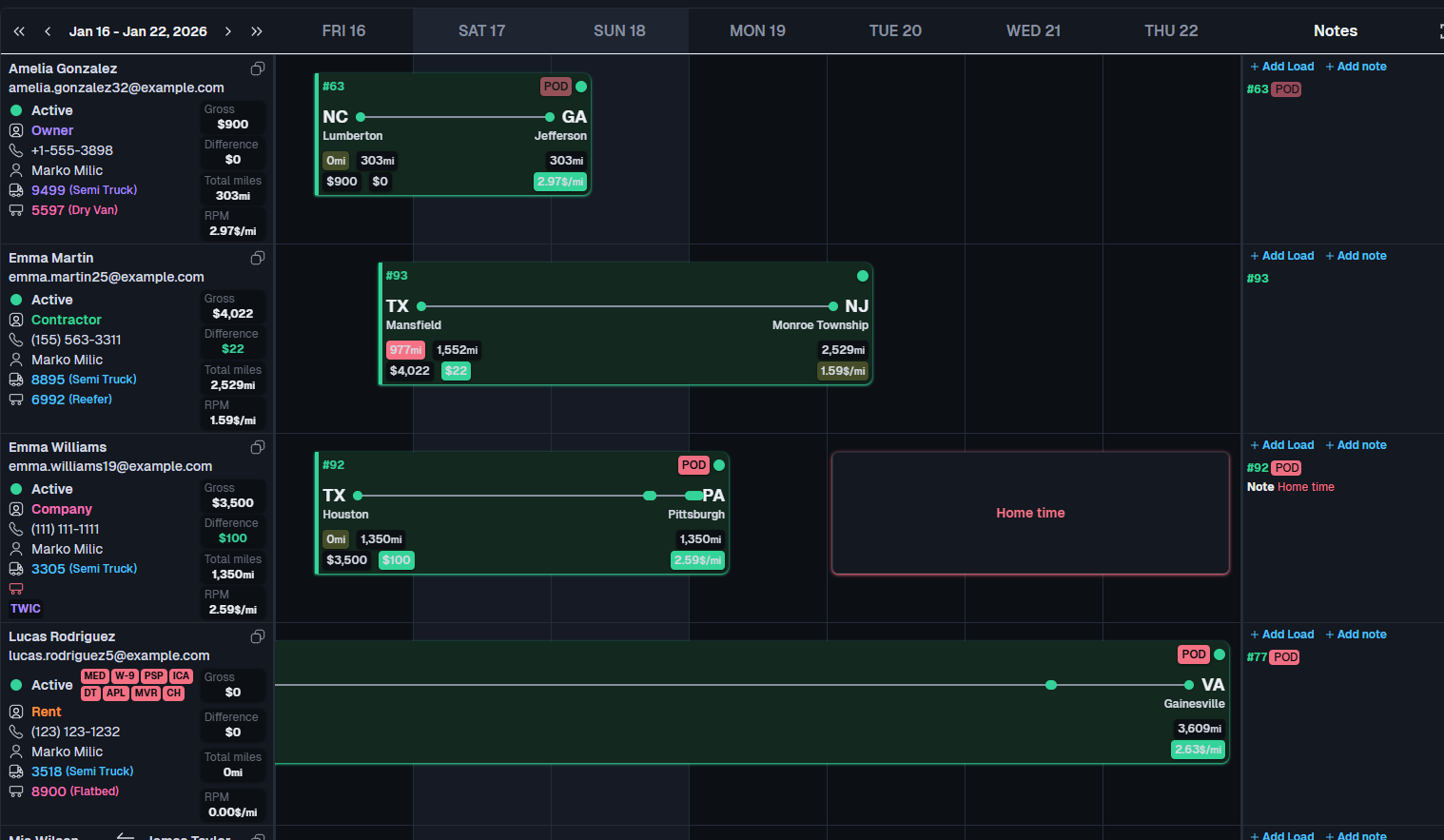
Every dispatcher sees the same board at the same moment. Changes push over a live connection — no refresh button, no stale copy, no arguing about whose spreadsheet is right.
Drivers, trucks, trailers, loads and board notes all broadcast the moment they change.
Scheduled, In Progress, Delivered, Cancelled, TONU. The states a dispatcher actually uses.
By driver, truck, customer or status. Sort, search, and drag to move a load between days.
Each person picks their own columns and order. The layout is saved per user, per company.
“Home Thursday, back Monday.” Pinned to the driver for exactly as long as it matters.
Location and odometer pulled from the ELD every 15 minutes, shown against the load’s progress.
The whole platform
Not a dispatch tool with accounting bolted on later. Everything below ships today, in one product, at one price.
Roadside
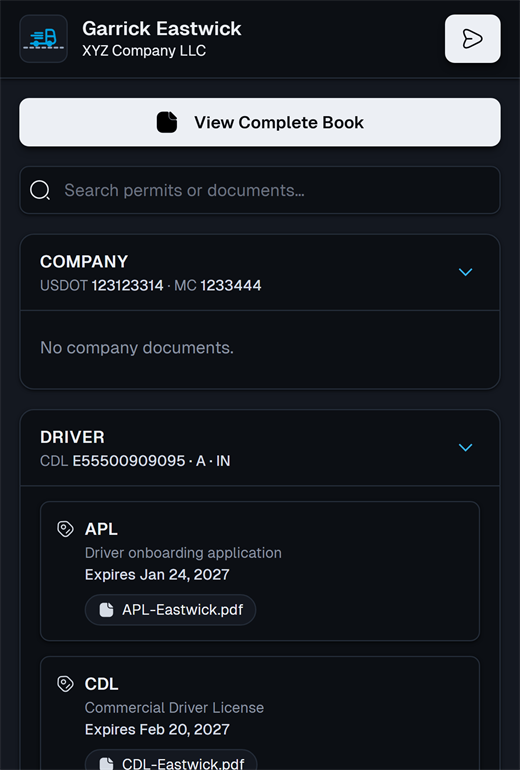
The digital permit book is a share link with a PIN and an expiry date. No app, no login, no account for the officer. Registration, insurance, the IFTA licence, MCS-90 and the authority letter come up as one bound PDF, loaded page by page so it opens on a bad signal at a scale house.
Generated per truck. Print it for the cab or send it to the driver.
The link alone is not enough. A short PIN is required to open the book.
Set how long the share stays valid. It closes itself afterwards.
Nothing to install and no account for the officer at the roadside.
Driver pay
Truck rent, insurance, escrow, ELD fees. Set the amount, the run day and how many runs are left, and the schedule posts to the settlement on its own — every week, without anyone remembering. Pause it, resume it, and see every run it ever made.
6
pay structures, from percentage to per-loaded-mile
9
built-in deduction types, plus your own
3
recurrence frequencies, with retroactive catch-up
1099
reporting for drivers and contractors at year end
Holding groups
Switch companies from the header without logging out, and hold a different role in each one — Accounting in the first, Safety in the second. The group view keys on the VIN rather than the company, so a truck that moved between entities is one row with each company’s record beneath it. If it is still active in both, it says so.
Drivers, trucks and trailers rolled up across every company you have access to.
Access is granted one company at a time. Nothing leaks sideways between entities.
An asset still active in two companies is flagged, not silently merged.
Where it fits
| Capability | Spreadsheets + QuickBooks | Dispatch-only tools | DispatchTrace |
|---|---|---|---|
| Dispatch board | Manual | Strong | Real-time, multi-user |
| Driver settlements | By hand | Basic or none | Six pay types, automated |
| Compliance tracking | A binder | Usually separate | Built in, two-phase alerts |
| Factoring workflow | Manual | Rare | Batch, export, AI reconciliation |
| Time to first load | Immediate | Days to weeks | Same day |
| Typical monthly cost | Cheap, until it breaks | Per seat | $100 + $1 per load |
Pricing
No per-seat fee, so the whole office can have a login. No module upsell — every feature on this page is included. Invoiced monthly.
$100 / month
+ $1 per load
A fleet running 200 loads a month pays $300. Unlimited users, all modules, every company in your group.
Questions
EVA ELD and Hive ELD today. We pull truck location and odometer every 15 minutes and show it against the load. We do not pull hours-of-service or DVIR, and we do not ask you to switch ELD providers — if you run Motive or Samsara, DispatchTrace works alongside it and that connector is on the roadmap.
Not by API. You build the batch in DispatchTrace, export the Excel summary and a ZIP of the load documents, and send it to your factor the way you do now. When their payment report comes back, AI reads it and matches every payment to the right invoice.
For everything trucking-specific, yes — load billing, settlements, statements, factoring, aging and 1099s all live here. There is no QuickBooks connector, so your bookkeeper still handles general ledger and taxes in whatever they use today.
No. Drivers do not get logins. The one thing built for the roadside is the digital permit book, which opens from a QR code on any phone with no app and no account. A driver app is on the roadmap, not shipped.
A day, not a quarter. We create your company, import drivers, trucks and trailers from a spreadsheet, and you dispatch the same afternoon. There is no implementation project and no consultant.
Twenty to five hundred trucks, with the typical customer around fifty. Below about twenty, a spreadsheet still just about works. Above five hundred, you are probably buying an enterprise TMS with a dedicated implementation team.
$100 a month plus $1 per load created that month. No per-seat fee and no per-truck fee, and every module is included. A fleet running 200 loads a month pays $300. Invoices go out monthly and are due within ten days.
Eight roles — Company Admin, Dispatch Manager, Dispatch, Safety, Fleet, Accounting, After Hours and Guest. Roles are assigned per company, so someone can do Accounting in one entity and nothing at all in another. Every change is written to an append-only audit log.
Thirty minutes, screen shared, using a rate confirmation you send us beforehand. You will see your load built by the extraction, not a canned demo.